Product development / Case studyထုတ်ကုန်ဖန်တီးရေး / ပရောဂျက်လေ့လာချက်
WATeamInbox
Shared customer conversations. Controlled AI access.
We built WATeamInbox to bring WhatsApp and Telegram conversations into a shared team workspace, make handoffs clearer, and let teams decide what external AI tools can access and do.
ဖောက်သည်စကားပြောဆိုမှုများကို မျှဝေပါ။ AI အသုံးပြုခွင့်ကို ထိန်းချုပ်ပါ။
WhatsApp နှင့် Telegram စကားပြောဆိုမှုများကို အဖွဲ့သုံးလုပ်ငန်းနေရာတစ်ခုတွင် စုစည်းရန်၊ တာဝန်လွှဲပြောင်းမှု ပိုမိုရှင်းလင်းစေရန်နှင့် ပြင်ပ AI ကိရိယာများက မည်သည့်အချက်အလက်ကို ကြည့်နိုင်ပြီး မည်သည့်လုပ်ဆောင်ချက်ကို ပြုလုပ်နိုင်သည်ကို အဖွဲ့က သတ်မှတ်နိုင်ရန် WATeamInbox ကို တည်ဆောက်ခဲ့ပါသည်။
The challenge: messages without shared ownership
When customer conversations are spread across messaging apps and individual team members, it becomes difficult to know who is handling a reply, what has already been discussed, and when someone needs to take over. Missed replies and unclear handoffs were part of the problem WATeamInbox was built to address.
Connecting an AI assistant introduces another decision: which customer conversations should it be allowed to read, and which actions should it be allowed to perform? The goal was a shared workspace with deliberate access controls, rather than treating every connected tool as if it needed the same permissions.
What we built: one workspace for the conversation
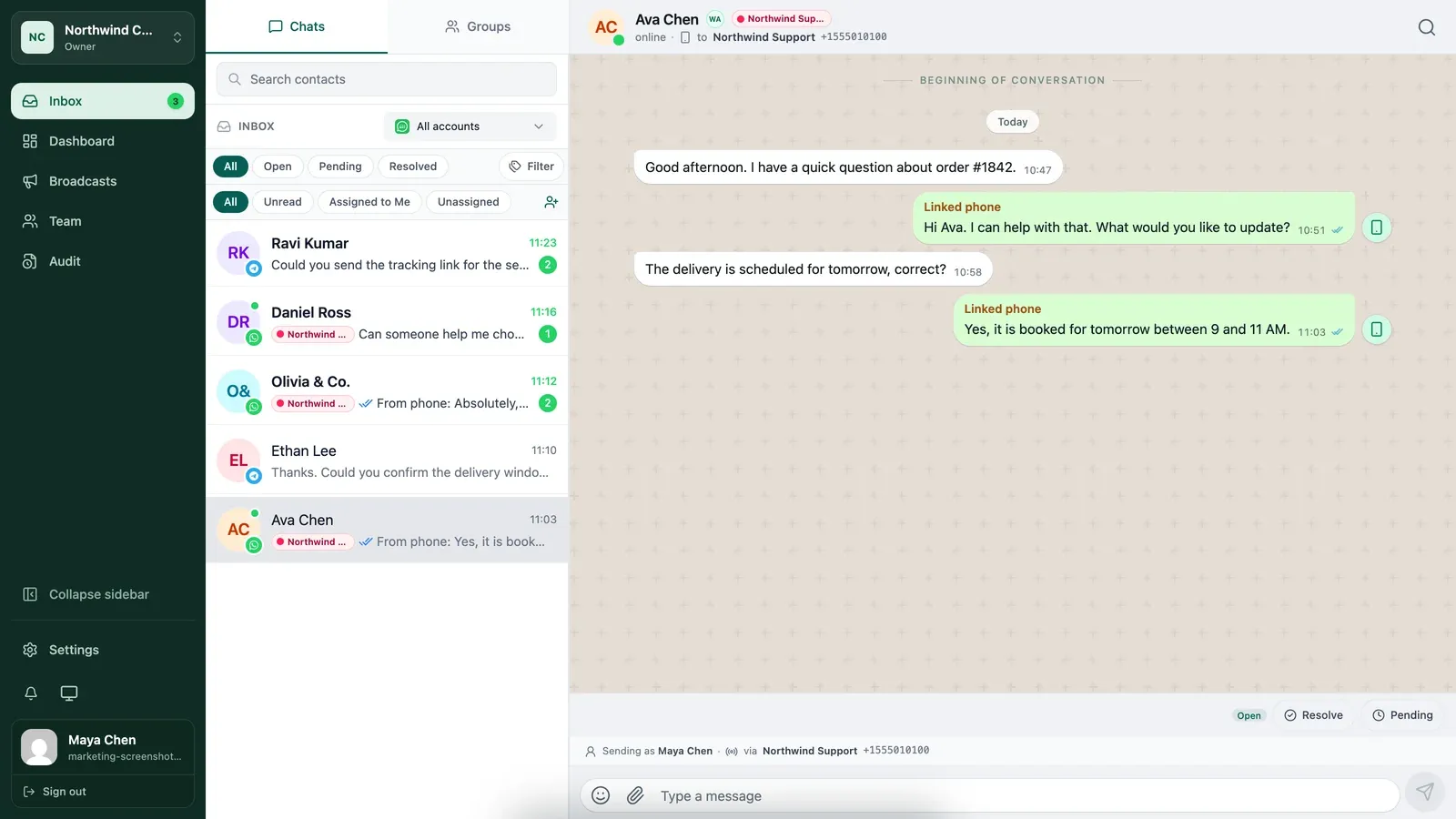
WATeamInbox brings WhatsApp linked-device and Telegram Bot conversations into one shared inbox. Teammates can assign conversations, leave internal notes and use shared history when taking over a customer reply.
External AI tools can connect through the product's integration interfaces. Teams can scope access to particular channels or inboxes and distinguish permission to read from permission to perform actions. The focus is connecting external AI tools to the team's workflow with explicit permissions.
Shared context
Conversation history and internal notes stay alongside the work, giving the next teammate context for a handoff.
Explicit ownership
Conversation assignments make responsibility visible inside the shared inbox.
Scoped AI access
Choose the channels or inboxes available to an external AI integration, with separate read and action permissions.
Why this approach: control without a single hosting path
The aim is not simply to put more messages on one screen. People need shared context, while integrations need access appropriate to their task. Keeping channel scope and read/action permissions distinct gives teams a way to make those choices explicitly.
WATeamInbox is available as a managed cloud service or as MIT-licensed software for self-hosting. Teams can choose a managed service or take responsibility for running their own deployment, rather than being limited to one hosting model.
Current channel support covers WhatsApp linked devices and Telegram Bots.
What this project demonstrates
This project brings together messaging integrations, shared-inbox workflows, configurable access for external AI tools, and managed or self-hosted software delivery. It shows how a product can connect operational work with AI integration while retaining explicit boundaries around access.
Need your conversations, workflows and AI tools to work together?
Tell us which channels your team uses, where handoffs break down, and what an AI tool should be allowed to read or do. We can discuss a solution around your workflow.
Discuss your projectစိန်ခေါ်မှု — မက်ဆေ့ချ်ရှိသော်လည်း တာဝန်ယူသူ မရှင်းလင်းခြင်း
ဖောက်သည်စကားပြောဆိုမှုများသည် မက်ဆေ့ချ်အက်ပ်များနှင့် အဖွဲ့ဝင်တစ်ဦးချင်းစီထံ ပြန့်ကျဲနေပါက မည်သူက ပြန်ကြားနေသည်၊ ယခင်က ဘာတွေ ဆွေးနွေးထားသည်၊ ဘယ်အချိန်တွင် အခြားသူက ဆက်လက်ကိုင်တွယ်ရမည်ကို သိရန် ခက်ခဲလာပါသည်။ ပြန်ကြားရန် လွတ်သွားခြင်းနှင့် တာဝန်လွှဲပြောင်းမှု မရှင်းလင်းခြင်းတို့ကို ဖြေရှင်းရန် WATeamInbox ကို တည်ဆောက်ခဲ့ပါသည်။
AI အကူအညီပေးကိရိယာတစ်ခု ချိတ်ဆက်ရာတွင် နောက်ထပ်ဆုံးဖြတ်ချက် လိုလာပါသည်။ မည်သည့်ဖောက်သည်စကားပြောဆိုမှုကို ဖတ်ခွင့်ပေးမည်၊ မည်သည့်လုပ်ဆောင်ချက်ကို ပြုလုပ်ခွင့်ပေးမည်နည်း။ ချိတ်ဆက်ထားသည့် ကိရိယာတိုင်းကို တူညီသောခွင့်ပြုချက် ပေးမည့်အစား အသုံးပြုခွင့်ကို သေချာသတ်မှတ်နိုင်သည့် အဖွဲ့သုံးလုပ်ငန်းနေရာတစ်ခု ဖြစ်စေရန် ရည်ရွယ်ခဲ့ပါသည်။
တည်ဆောက်ထားသည့်ဖြေရှင်းချက် — စကားပြောဆိုမှုအတွက် လုပ်ငန်းနေရာတစ်ခု
WATeamInbox သည် WhatsApp ချိတ်ဆက်စက်နှင့် Telegram Bot မှ စကားပြောဆိုမှုများကို အဖွဲ့သုံး inbox တစ်ခုတွင် စုစည်းပေးပါသည်။ အဖွဲ့ဝင်များထံ စကားပြောဆိုမှု တာဝန်ပေးခြင်း၊ အတွင်းသုံးမှတ်စု ရေးခြင်းနှင့် ဖောက်သည်အား ဆက်လက်ပြန်ကြားရာတွင် မျှဝေထားသော စကားပြောမှတ်တမ်းကို ကြည့်ခြင်းတို့ ပြုလုပ်နိုင်ပါသည်။
ပြင်ပ AI ကိရိယာများကို ထုတ်ကုန်၏ ချိတ်ဆက်ရေးအင်တာဖေ့စ်များမှ ချိတ်ဆက်နိုင်ပါသည်။ မည်သည့်ချန်နယ် သို့မဟုတ် inbox ကို အသုံးပြုခွင့်ပေးမည်ကို ရွေးချယ်နိုင်ပြီး ဖတ်ခွင့်နှင့် လုပ်ဆောင်ခွင့်ကို ခွဲခြားသတ်မှတ်နိုင်ပါသည်။ ပြင်ပ AI ကိရိယာများကို ရှင်းလင်းသောခွင့်ပြုချက်များဖြင့် အဖွဲ့၏လုပ်ငန်းစဉ်နှင့် ချိတ်ဆက်နိုင်ရန် အဓိကထားပါသည်။
အကြောင်းအရာကို မျှဝေသိရှိခြင်း
စကားပြောမှတ်တမ်းနှင့် အတွင်းသုံးမှတ်စုများကို အတူထားရှိသဖြင့် တာဝန်လွှဲယူသည့်အဖွဲ့ဝင်က ယခင်အကြောင်းအရာကို သိရှိနိုင်ပါသည်။
တာဝန်ယူသူ ရှင်းလင်းခြင်း
စကားပြောဆိုမှု တာဝန်ပေးခြင်းဖြင့် အဖွဲ့သုံး inbox အတွင်း တာဝန်ယူသူကို မြင်နိုင်ပါသည်။
AI အသုံးပြုခွင့်အတိုင်းအတာ
ပြင်ပ AI ချိတ်ဆက်မှုအတွက် ချန်နယ် သို့မဟုတ် inbox ကို ရွေးချယ်ပြီး ဖတ်ခွင့်နှင့် လုပ်ဆောင်ခွင့်ကို သီးခြားသတ်မှတ်နိုင်ပါသည်။
ဤနည်းလမ်းကို ရွေးချယ်ရသည့်အကြောင်း — ထိန်းချုပ်မှုနှင့် ဟို့စတင်းရွေးချယ်ခွင့်
ရည်ရွယ်ချက်မှာ မက်ဆေ့ချ်များကို စာမျက်နှာတစ်ခုတည်းပေါ်တွင် စုထားရုံမျှ မဟုတ်ပါ။ အဖွဲ့ဝင်များက အကြောင်းအရာကို မျှဝေသိရှိရန် လိုအပ်သကဲ့သို့ ချိတ်ဆက်ထားသည့် ကိရိယာများကလည်း မိမိအလုပ်နှင့် ကိုက်ညီသော အသုံးပြုခွင့်သာ လိုအပ်ပါသည်။ ချန်နယ်အတိုင်းအတာနှင့် ဖတ်ခွင့်၊ လုပ်ဆောင်ခွင့်တို့ကို ခွဲခြားထားခြင်းဖြင့် ထိုရွေးချယ်မှုများကို ရှင်းလင်းစွာ သတ်မှတ်နိုင်ပါသည်။
WATeamInbox ကို စီမံပေးထားသည့် ကလောက်ဝန်ဆောင်မှုအဖြစ် သုံးနိုင်သကဲ့သို့ MIT လိုင်စင်ဖြင့် ကိုယ်ပိုင်ဆာဗာပေါ်တွင်လည်း တပ်ဆင်နိုင်ပါသည်။ အဖွဲ့များသည် ဟို့စတင်းပုံစံတစ်ခုတည်းကိုသာ သုံးရခြင်းမရှိဘဲ စီမံပေးထားသည့် ဝန်ဆောင်မှုကို ရွေးချယ်နိုင်သလို မိမိတပ်ဆင်မှုကို မိမိတာဝန်ယူ လည်ပတ်နိုင်ပါသည်။
လက်ရှိတွင် WhatsApp ချိတ်ဆက်စက်နှင့် Telegram Bot တို့ကို ပံ့ပိုးထားပါသည်။
ဤပရောဂျက်က ပြသသည့်စွမ်းရည်များ
ဤပရောဂျက်တွင် မက်ဆေ့ချ်ဝန်ဆောင်မှုများ ချိတ်ဆက်ခြင်း၊ အဖွဲ့သုံး inbox လုပ်ငန်းစဉ်များ၊ ပြင်ပ AI ကိရိယာများအတွက် အသုံးပြုခွင့် သတ်မှတ်ခြင်းနှင့် စီမံပေးထားသော သို့မဟုတ် ကိုယ်ပိုင်ဟို့စတင်းဖြင့် ဆော့ဖ်ဝဲပေးအပ်ခြင်းတို့ကို ပေါင်းစပ်ထားပါသည်။ လုပ်ငန်းလည်ပတ်မှုနှင့် AI ချိတ်ဆက်မှုကို ဆက်စပ်ပေးရာတွင် အသုံးပြုခွင့်အတိုင်းအတာကို ရှင်းလင်းစွာ ထားရှိနိုင်ပုံကို ပြသထားပါသည်။
ဖောက်သည်စကားပြောဆိုမှု၊ လုပ်ငန်းစဉ်နှင့် AI ကိရိယာများကို ချိတ်ဆက်လိုပါသလား။
သင့်အဖွဲ့သုံးနေသည့် ချန်နယ်များ၊ တာဝန်လွှဲပြောင်းရာတွင် ကြုံတွေ့ရသည့်အခက်အခဲများနှင့် AI က ဖတ်ခွင့် သို့မဟုတ် လုပ်ဆောင်ခွင့် ရှိသင့်သည့်အရာများကို ပြောပြပါ။ သင့်လုပ်ငန်းစဉ်နှင့် ကိုက်ညီသည့် ဖြေရှင်းချက်ကို ဆွေးနွေးနိုင်ပါသည်။
သင့်ပရောဂျက်ကို ဆွေးနွေးရန်